Four months of agentic coding
I can't write code, but I built 9 webapps. What I'd tell anyone curious about Claude Code who hasn't tried it yet.
Four months ago, I couldn’t write code. I still can’t write code. But now I’ve built 9 webapps, including several I’m using every day.
You’ve probably guessed that what helped me do this was agentic coding tools. But, beyond the tool, what helped me most is treating every chat as an opportunity to improve my workflow for all future chats.
I write about Claude Code throughout, because it’s the tool I use and know. Most of what’s here applies equally to Codex, Cursor, and the other equivalent tools.
On this page:
- Where I started and where I got to
- When to use each type of instruction
- My Claude Code setup, mapped
- The top 6 things I learned
- How to get started today
Where I started and where I got to
I did a bit of computer science at uni, but never applied it at work. Although in my day job as a group product manager, I closely collaborate with engineers and architects. So I’m comfortable discussing system design and technical concepts.
I’ve always had the intent of learning to code and building my own side projects. It just never got to the top of my to-do list. About 4 months ago, I heard people talking about vibe coding and agentic software development tools, and I thought I’d give it a try.
I installed Claude Code and started experimenting, and my first project was a front-end only proof of concept, just to see if I could make something functional. It escalated quickly from there. The creativity of building things has been very addictive.
Four months later: 9 webapps, 11 internal services and shared libraries, 7,936 automated tests and 271,377 lines of code. I’m trying my best in this article to digest the top takeouts from my experience to help others, especially non-developers who are curious about agentic tools, but haven’t got started yet.
Everything in this article is from personal use: side projects and prototyping. Large existing codebases bring their own challenges, and I haven’t explored those at all.
When to use each type of instruction
One of the things that was most confusing to work out was when to use all the different types of configuration available with Claude Code.
They are each useful for different things, and if you use the wrong one, you can actively hinder your efforts. Before I worked this out, I went through a phase of using sub-agents for way too many things, and it both slowed down my work and increased token usage.
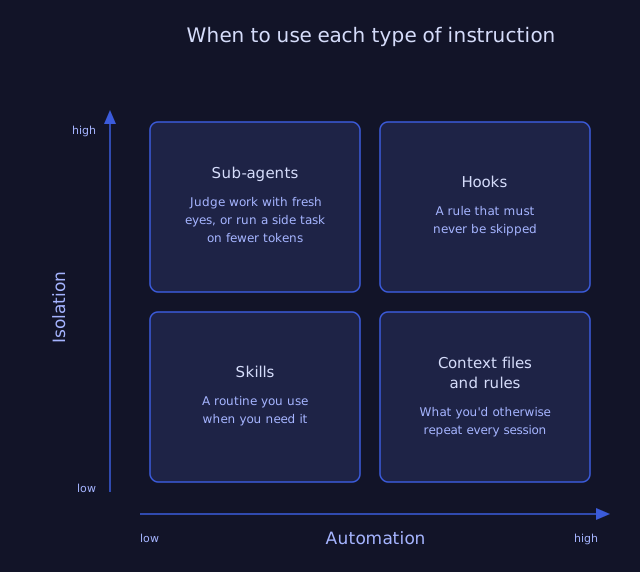
Here are a few real practical examples of each type of configuration from my own workspace.
| Type | What it is | When to use it | From my setup |
|---|---|---|---|
| Context files and rules | Notes Claude Code reads by itself, every chat or whenever you open a matching file | What you’d otherwise repeat every session |
|
| Skills | A named procedure you call when you want it | A routine you use when you need it |
|
| Sub-agents | A second agent that starts with nothing loaded | Judge work with fresh eyes, or run a side task on fewer tokens |
|
| Hooks | A script that runs by itself at a set moment, and can stop you | A rule that must never be skipped |
|
| MCPs | A connection that lets Claude Code reach a tool outside the chat | Work that lives somewhere Claude Code can’t see |
|
My Claude Code setup, mapped
The map shows the instructions, context, skills, sub-agents and other configuration I’ve done to optimise how I use Claude Code over the last four months, as well as some of the reusable libraries and tools that I’ve created with Claude Code. It’s here to give practical examples of how things can work.
It didn’t start like this. I started with pretty much nothing. So don’t be scared. This is what’s organically built up over time to help me be more effective with all my side projects. And you don’t need to start with this.
Don’t read this as a model setup. This is real-world usage, with real messiness: some duplication, some outright contradictions. I’m due another pruning pass. This is a continuous work in progress.
I always find practical real examples better than theory in learning things. If you want to see what a sub-agent is like or what a skill is like, you can have a look at some of mine and compare and contrast.
Click and drag to move around, zoom in and out using pinching or scrolling, and click on things to see their details.
The map itself is drawn by a small open-source tool I built, if you want to make one for your own setup.
The top 6 things I learned
- Do a retro at the end of every chat
- Give Claude Code ways to check its own work
- Work in code and text files
- When the same problem keeps happening, write a script to fix it reliably
- Give Claude Code access to a design system
- Do one task per chat
Do a retro at the end of every chat
The single most useful practice, both for improving how Claude Code is set up and for my own learning, was a retro at the end of every chat.
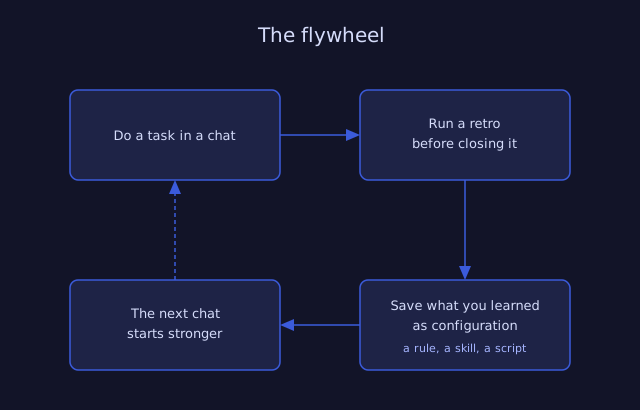
This loop is the flywheel: each chat ends with a retro, and what it finds is saved as setup the next chat starts from. Normally, when you or your team decide to work differently, everyone has to remember to actually do it, and in the busy day to day that often doesn’t happen. But with Claude Code, if you document the changes to ways of working in the right way, it will happen without anyone needing to remember to do it. So continuous improvement is even more powerful with Claude Code than in the way we worked before.
It’s easy to do. Create a skill that you run at the end of every chat and includes a retro. I use my session-end skill whenever I’ve completed a task with Claude Code’s help, and it does a retro based on the back and forth in the chat, picks up any issues that happened and makes suggestions for how to solve. Some of the suggestions are great. Some are not worth doing. But it triggers the right conversation to identify improvements.
What you have to watch for when working with Claude Code is that LLMs will usually recommend adding more rules or context or skills to resolve a specific problem, but due to the weight of complexity that each rule adds, they can end up creating worse outcomes in aggregate. Subtractive change (removing and simplifying things) is often far more effective than additive change, but it’s harder to see and harder to work out the right things to remove. John Cutler wrote a great article on it.
So it’s important to regularly review and look for opportunities to simplify and to remove, even more so than usual. Removing is harder than adding, but is so important in achieving better outcomes.
Give Claude Code ways to check its own work
The first huge improvement in quality that I saw was when I gave Claude Code a way to check its own work.
This is one of the most important things you can do to free yourself from nitty gritty feedback and focus more on outcomes.
This does require you to clearly set quality standards for Claude Code to meet.
For most of the things I’ve been doing, work revolves around the web browser. So for me, the Playwright MCP - which allows Claude Code to easily drive a web browser and take screenshots - was the single most important tool. Once I got that configured and working, that was the game changer.
Another method is to use sub-agents. You have Claude Code do the work, and then a sub-agent that hasn’t seen your chat reviewing the work that was done strictly versus the quality rules you have defined. This relies on you setting quality rules that are checkable by a sub-agent.
If you layer different techniques here on top of each other, you will generally get a much higher quality output that’s far closer to 100% correct on the first go.
Even if your work is a document or a deck rather than code, the same techniques apply. Define what good looks like before Claude Code starts, then have a sub-agent read or look at the finished work and judge it against those rules.
Work in code and text files
Even non-technical work, to make the best use of LLMs, needs to be expressed in a format that LLMs can easily work on. And the big AI companies, OpenAI, Anthropic, are focusing their efforts on agentic coding, because that’s where the money is. So the easiest way to make your work available to LLMs is to express it the way code is: as plain text files. A markdown document counts.
This could be uncomfortable because it is a big change, especially if you’ve never coded before, and never committed code to a repo. It’s a new way of working, but it seems to be the way LLMs are going. Maybe one day multimodal tools will be at the point where this is not necessary. But for now, code first is the way to use LLMs most effectively.
One example: I’ve been building UI prototypes in code, rather than mocking them up in Figma. Thinking back to why high fidelity mock-ups existed, it was because they were faster to make than real code, and that’s simply no longer the case. A coded prototype takes about the same time, but is fully clickable, interactive, and a higher fidelity replica of how the real thing will behave than a static mock-up, including the animations, transitions.
Not that you should jump straight from nothing to code when thinking of a customer experience. Instead, express designs in diagrams or literal sketches. When those user flows are sufficiently good, they can be handed to an LLM to build a high fidelity interactive prototype in 10-20 minutes.
So the takeout is: whatever your work is, look for ways to turn it into code and use that as the way that you interact with the LLM.
When the same problem keeps happening, write a script to fix it reliably
This is one I picked up after my CLAUDE.md file ended up collecting a whole lot of rules, and I started to see that they were not being applied consistently.
LLMs are not deterministic, meaning that you can give them exactly the same inputs and you’ll get a different response each time. This is great for things that require creativity, but not great where you want rules to be applied consistently.
If you have a hundred rules and they’re applied correctly 95% of the time, then you’re going to have 5 rules applied wrongly every single time. So as the volume of context and rules grows, you’re going to have a harder time getting LLMs to apply them correctly.
The answer is to get Claude Code to write deterministic scripts to fix things reliably, and use hooks to make sure that those scripts run at the right point in time and force Claude Code to re-do things that are wrong.
None of this is specific to code. If you get creative, scripts can check a document as easily as they can check a program. They can check that every link works, that the reading level is easy to understand, and that every acronym is spelled out the first time it appears.
The good news is LLMs can write those scripts for you. You just need to clearly define what you need them to check for, and validate that they’re working once they’re implemented.
Doing this will also mean that you reduce token usage, because you’ve got simple old code running to validate rules rather than a whole heap of LLM API calls.
One example is a design system, where you have specific colour and spacing values that are allowed. If you use an LLM to create scripts that run before any code is committed, and fail if there are any colours used that are not allowed, then the problem is solved permanently.
Examples from my own setup:
- Refusing a planning document that isn’t linked to a backlog item. Keeps every document attached to the piece of work it belongs to.
- Checking every reply against my writing rules before it reaches me. If it’s too dense it blocks and names the words to swap. Nothing to do with code.
- Refusing a find-and-replace that edits a file in place. It rewrites every match while showing you only the pattern, so a replacement written for one line quietly changes the others. The block names the safer tool instead.
Give Claude Code access to a design system
Most large organisations have a design system. To be effective with Claude Code, your design system needs to be more than just a list of components. Your design system also must have very clear, very specific, very accurate guidance on when and how those components should be used.
If you can get Claude Code access to that, it can produce high fidelity prototypes in 10-20 minutes.
This is not Claude Code doing design for you. This is having a clear set of components and usage rules, so that once you have expressed the user flow, the things that you want a user to experience, Claude Code can compose the components that you have into an interactive prototype so you can quickly test the experience.
This is a powerful way of speeding up design iterations, and to experience the nuances that don’t come through in a static set of mock-ups but do come through in a prototype that’s a functional piece of code.
Do one task per chat
This one is simple but often overlooked.
The way many people use LLMs is to have a long running chat on a topic, or even many topics, and to continue adding into that one chat. Don’t do that! Stick to one task per chat, and start a fresh chat with a fresh context when you start a new task.
There’s two benefits. One is it uses far fewer tokens, helping your usage go further.
Secondly, it’s a forcing function that makes sure you store context in the right way. If you’re finding that you want to continue in an existing chat because there’s useful context there and you don’t want to re-prompt, that is a sign that that context is something reusable that should become a skill, or a sub-agent, or some other form of configuration in Claude Code.
How to get started today
Step one is install Claude Code. You will need to sign up to at least the US$20 per month plan to do anything much. It’s worth subscribing for a month or two to give it a go and learn, if you can afford it.
Step two is make a code repo for your Claude Code configuration. So this is all of your skills, context, and so on. GitHub is free. If you’ve never made a repo, ask Claude Code to set it up for you. That’s a good first task. You can upgrade to Pro later if you want, but the free plan is very generous. This will let you have all of your configuration saved, and portable to any device. You can share with friends or coworkers.
One example: I’ve created a what’s new agent that ingests the changes made across all of my projects and writes what’s new posts for this website, using a consistent writing style. Having all of my context and skills portable, it was easy to create a fully automated agent to do this on a schedule each day.
Step three, write a session-end skill, including a retro. This is going to be very personal to you and the type of work that you do. Start with something, get in the habit of running it, and start with at least the retro in there. It’s useful to help remember to clean up any loose ends at the end of the chat, and reflect on what went well and what didn’t, and what changes you should add to your flywheel.
Step four. There are three tools that I think everyone in a tech or tech-adjacent role should have configured in Claude Code.
One is Playwright. This is what gives Claude Code eyes and lets it check its work. If it’s anything that can be loaded in a web browser, then Playwright lets it load it up, take screenshots, compare it to what it expects to see, and fix issues before you have to see them yourself.
Second is GitHub, or whatever other code repo you use, as a live connection for Claude Code. If you are collaborating on code or on documents with others, then at least having read access will help you have all the context you need to do the best work. If you’re working on a team, this is what lets you share your skills, context on your shared projects, and other configuration so every new team member doesn’t need to start from scratch.
Then third, one that can wait until the first two are working: integrate whatever backlog or work management tool you use. Might be Jira, Asana, Monday. I’ve got my own home-brew storymap tool. But if you can get read and write access for Claude Code to this tool, it means that it can start keeping all of your tickets up to date, reading your tickets, letting you know about stuff you can help with.
And then step five is pick something and try it. It’s easy to drown in writing and best practices when using these tools. There’s so much written, there’s so many opinions, but it’s important to just get started.
Pick a small to medium task and challenge yourself to see how Claude Code can help with that task. And if you’re not sure how it can help, then just ask it. At the end, work out what worked and what didn’t, and change your setup to improve it. Then try again next time and see what went better. And that’s the flywheel.
That’s really all you need to get started. There is heaps more good stuff out there, lots of good skills and plugins that you can copy and paste into your own environment. But what really matters is getting started. Getting your hands dirty is the best way to learn.